A Jev-compatible API for text, images and video
Use DiffusionGemma through Prem to ask focused questions and get answers your workflow can use.
TL;DR: Prem’s decision API uses DiffusionGemma with the Jev-compatible SystemOne interface and zero data retention. Ask up to 16 questions about written or visual context and receive structured answers with probabilities. Try the playground, then connect the API to your application’s rules.
Before a workflow can move forward, someone has to decide what should happen next. A customer’s screenshot might need technical support, while a document with missing information needs further review. Using AI here means defining the judgment clearly enough for a person to check and for software to act on.
Decision models focus on these bounded judgments. You supply the information and define the possible answers; the model returns its assessment in a specified format.
Language models already handle classification and structured output. The decision-model approach makes those assessments the main job, with a consistent interface for asking questions and reading results.
Where System 1 and Jev fit
TypeSafe calls its approach System One, after the account of human thinking popularized by Daniel Kahneman. System 1 describes fast, intuitive judgments; System 2 describes slower, deliberate reasoning. Here, the name describes the focus on quick, narrowly defined decisions.
Jev is TypeSafe’s first System One model. It returns a choice among options, a probability for a yes/no question, or a score against a defined scale. Your application uses those assessments to decide whether to proceed, request more information or involve a person.
Powered by DiffusionGemma, served through Prem
We’re bringing a Jev-compatible decision API to Prem with zero data retention. Neither Prem nor the serving partner retains your prompts or completions. Request content is processed in plaintext at the gateway and serving partner; this route does not use confidential enclave execution. API reference.
Powered by DiffusionGemma and available through our playground and API, it supports text, images and short video. You can ask up to 16 independent questions per request and combine all three answer types:
| Type | What you receive |
|---|---|
| Choice | A selected option and probabilities across the choices you define. |
| Noul | A probability for a yes/no question. |
| Score | A score and probability distribution over an ordered rubric you define. |
Prem handles serving, authentication, rate limits and usage accounting. The gateway authenticates and routes the request; the decision service prepares its context, questions and visual inputs for DiffusionGemma. Typed answers, probabilities and usage information return through the gateway.
The SystemOne interface keeps familiar question and answer formats. Because the underlying model is DiffusionGemma, evaluate its answers and probability behavior on your own workload when moving an existing Jev integration.
Why we chose DiffusionGemma
We wanted to return structured answers quickly, support visual context and keep the model practical to serve. DiffusionGemma, Google’s experimental open model based on Gemma 4, gave us a way to meet those requirements. Its weights are published under Apache 2.0.
DiffusionGemma can refine multiple answer positions together. Our structured-read setup holds an answer template in place and leaves spaces for the answers. After processing the context, it reads the scores at those positions in one denoising step, then converts them into the API’s Choice, Noul and Score responses.
For a question about which team should handle a request, the result is a probability for each option you supplied. Your application receives a defined answer it can use for routing, with the probabilities available for review.
Our deployment runs on a single 96 GB Blackwell GPU. Keeping the model on one GPU simplifies serving, while its support for images and short video lets us apply the same questions to written and visual information. A customer’s screenshot can be part of the assessment alongside their message.
Bringing structured decisions to images and video
Jev currently accepts text only. Through Prem, the same answer types also work with an image or sampled video frames.
For a failed-payment report, you could supply the message and screenshot together, then ask which team should handle it, whether the customer is blocked, how urgent it is and whether it needs human review. Document workflows can use extracted document text; a short recording can provide visual context when a screen changes.
The API accepts one image as a base64 data URL, or one MP4 of up to 30 seconds, 10 MiB and 1920 × 1080 pixels. Video uses up to four sampled frames.
Images and video require separate requests; audio is not analyzed, and brief events can be missed between frames. The Decision guide shows the media formats.
Try it in the playground
You can explore the results before writing code:
- Sign in or create a Prem account. Create an API key in the dashboard with the
chats.completionpermission required by this route. See the API-key guide. - Check your prepaid balance. Requests are blocked when it reaches zero.
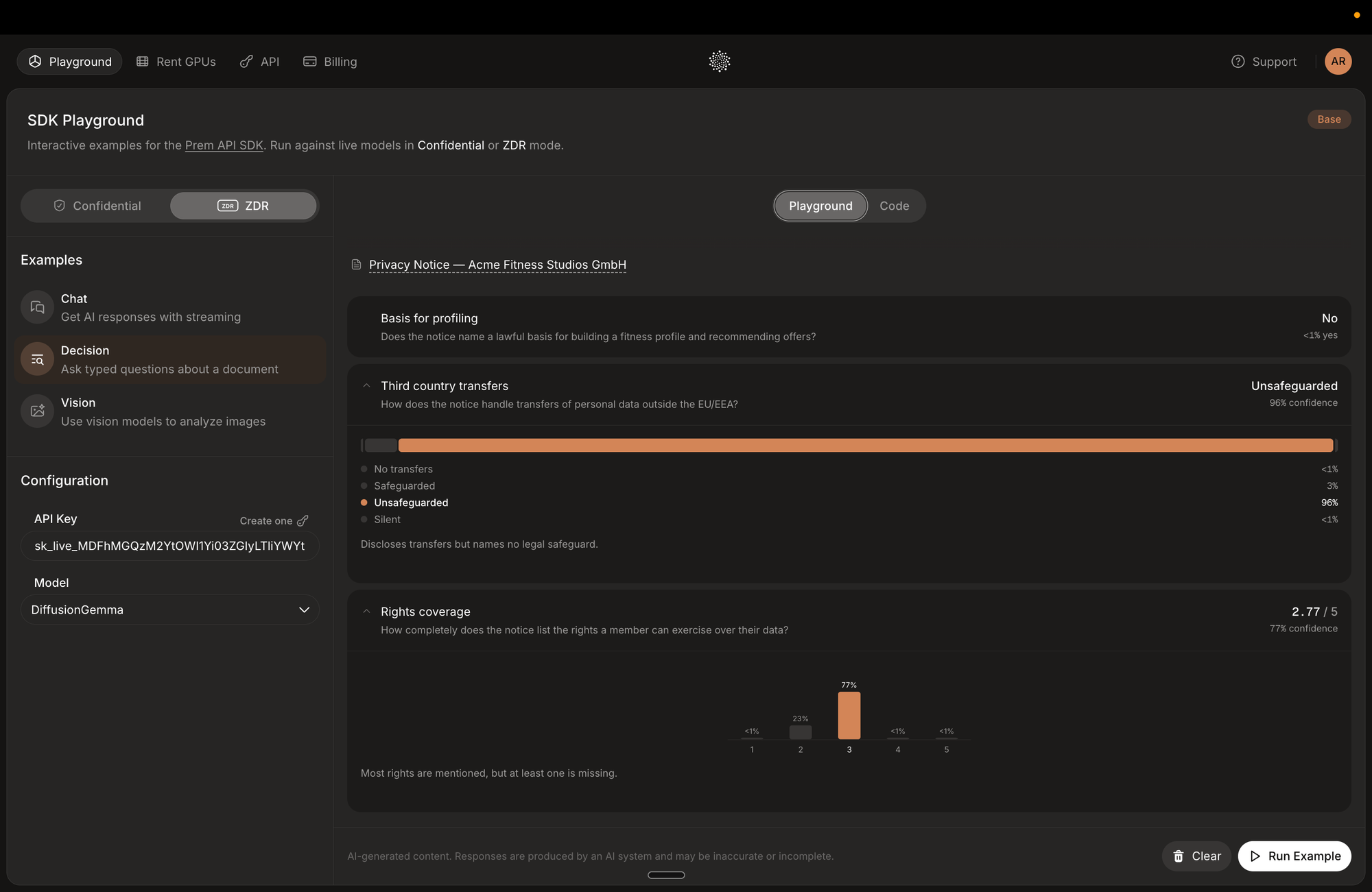
- Open Playground, select ZDR, choose Decision and select DiffusionGemma. Enter your key if required, then choose Run Example.
The sample privacy notice demonstrates all three answer types: whether a statement is present, how the notice describes data transfers, and how completely it covers members’ rights. Expand the results to inspect the distributions and check the assessments against the document.
Make your first API call
This example asks whether an illustrative notice explains how to request deletion of account data. On macOS or Linux, open a terminal and replace the placeholder with your Prem key:
export PREM_API_KEY='YOUR_PREM_API_KEY'Then run:
curl https://gateway.prem.io/typesafe/v1/systemone \
  -H "Authorization: Bearer $PREM_API_KEY" \
  -H "Content-Type: application/json" \
  -d '{
    "model": "dgemma",
    "state": "We use your email address to send account notifications. Contact support to request deletion of your account data.",
    "questions": {
      "deletion_mentioned": {
        "type": "noul",
        "instructions": "Does the supplied notice mention how to request deletion of account data?"
      }
    }
  }'
state holds the context; questions defines what to assess. Look for answers.deletion_mentioned.noul in the response: values closer to 1 favor yes, and closer to 0 favor no. Remove the deletion sentence and repeat the request to compare the results.
The endpoint returns one complete JSON response, without streaming, and supports up to four concurrent requests per API key; exceeding that limit can return HTTP 429.
Existing TypeSafe SDK integrations can use the base URL https://gateway.prem.io/typesafe with model dgemma. This is the SystemOne request format; OpenAI Chat Completions requests need adapting. See the request examples.
Decide what happens after the answer
Your application controls routing, escalation thresholds and human review. A support or operations team can define the checks; a developer can connect them to document intake, content classification, rubric-based review or an agent choosing a tool. Routing rules and thresholds can change without redesigning the questions.
Use focused questions, clear options and a review option for incomplete evidence. Questions in a batch cannot read each other’s answers; dependent questions need another request.
Probabilities are normalized model scores, not calibrated estimates of correctness. The confidence field is not a measured accuracy rate either, and changing option order can affect predictions. Test questions and action thresholds against representative examples from your workflow.
What we tested for launch
Our launch tests covered the gateway request path, authentication, usage accounting and visual-input validation. We checked Choice, Noul and Score formats, probability ranges, distributions and score calculations, including mixed batches of 16 questions and regression checks after adding video.
For images, we changed the visual content while holding the question fixed and checked that answers changed. For video, we reversed color sequences and checked first and last colors. These checks establish input handling, not accuracy across every visual task.
In a separate evaluation on 231 public JevBench items, our configuration answered 193 correctly (83.5%). All 231 responses had valid output formats, with none rejected or truncated. This measures performance on that test set; evaluate the questions and inputs your own application will use.
In a 60-second GPU-local confirmation test, the backend completed 780 requests at four concurrent requests, averaging approximately 13 requests per second with 440 ms p95 latency and no request errors. These measurements apply to that workload, before the production gateway and customer network. The load test checked request handling and answer shapes, not answer accuracy.
This work helped establish the initial serving configuration, alongside checks for supported inputs, complete answer sets, valid response shapes and predictable handling of invalid media.
Open the playground and try the document example, then use the API with a recurring question from your own workflow. For help defining those questions or connecting the results, talk to our team.