AI Code Security Audits: How Enterprises Can Continuously Detect and Fix Critical Vulnerabilities in Production Code
On this page
An AI code security audit checks your code for security problems, like exposed passwords, risky packages, and unsafe code, using AI along with proven testing methods.
- You can run these checks every time your code changes. Code written by AI coding tools gets the same checks as code your team writes by hand.
- Run different checks at different times. Check for exposed keys and risky packages on every commit, scan for unsafe code on every pull request, and test your running app before each release.
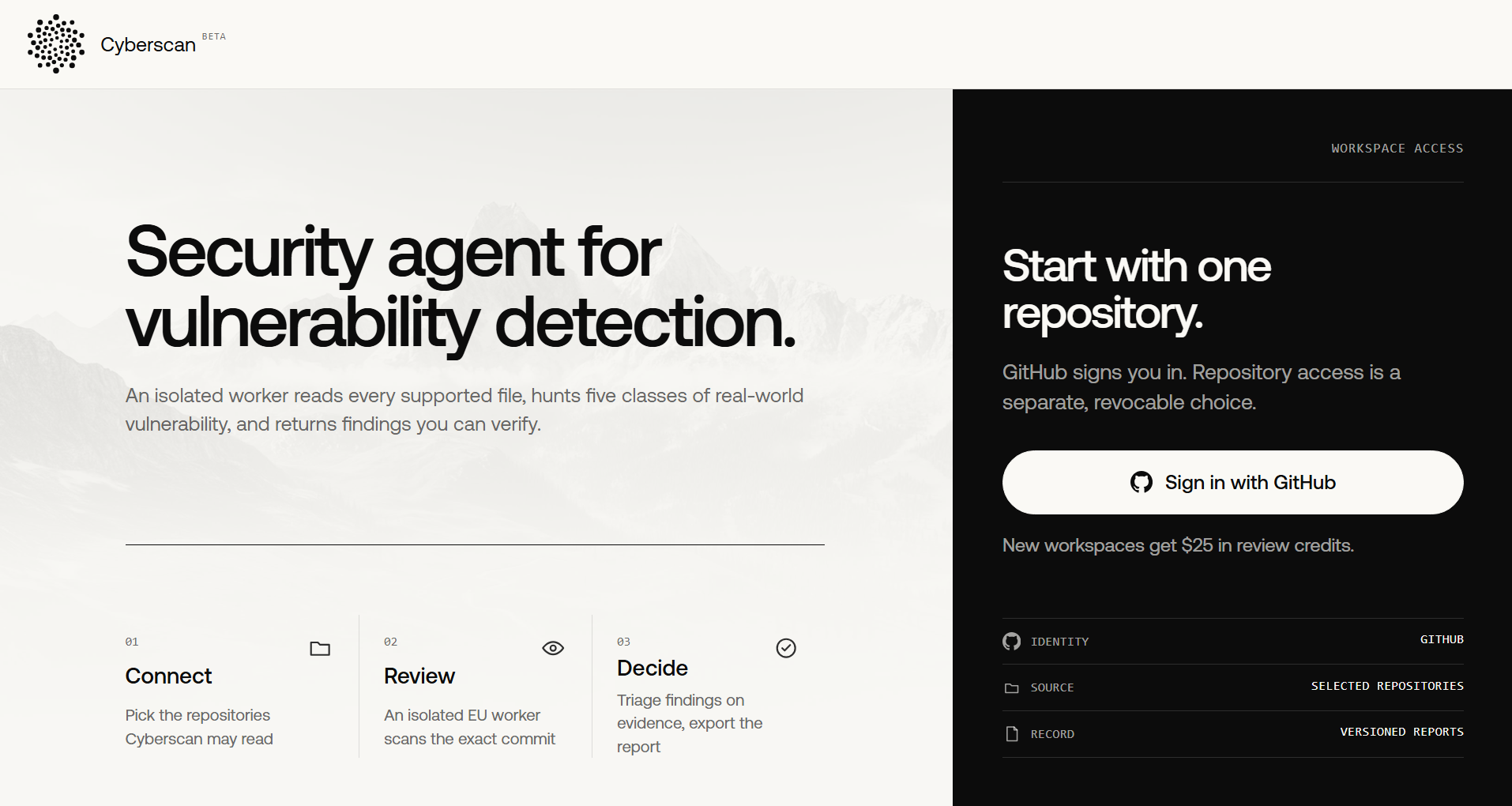
- With Prem Cyberscan, you connect your repository through the GitHub App, and every new commit gets scanned in its own isolated space. If a scan stops partway, it picks up where it left off.
- Each Cyberscan finding comes with proof, the exact file location, and a severity rating. Your team writes down a reason whenever it closes a finding, so you always have a clear record. You can also start scans and pull reports through the API.
In March 2025, security researcher Matt Palmer found a security flaw in apps built with Lovable. He documented it in CVE-2025-48757. The apps had missing or weak Row-Level Security (RLS) rules, which meant people could access database records without logging in.
The exposed data included personal details, API keys, access tokens, and financial information. In some cases, attackers could also change the data. Palmer's report credits developer Danial Asaria with independently finding the same issue. Asaria shared how he accessed personal debt amounts, home addresses, and admin-level API keys in live apps. Here's his post.
I just hacked multiple @lovable 'top launched' sites Wait—what? In less time than it took me to finish my lunch (47 mins), I extracted from live production apps: 💰Personal debt amounts 🏠Home Addresses 🗝️API keys (admin access) 🔥Spicy Prompts Screenshots in thread 🧵 Not as a hacker - as a curious dev with 15 lines of Python. This isn't a breach story (I reported it), this is a wake-up call. Be cautious which 'vibe coder' you trust with your personal data.
— Danial Asaria (@danialasaria) April 14, 2025
This shows how an app can work as expected while still having security gaps. If no one checks how the app protects its data, those gaps can put sensitive information at risk.
So, what does a continuous code security audit involve, and how can your team make it part of its development process?
What is an AI code security audit?
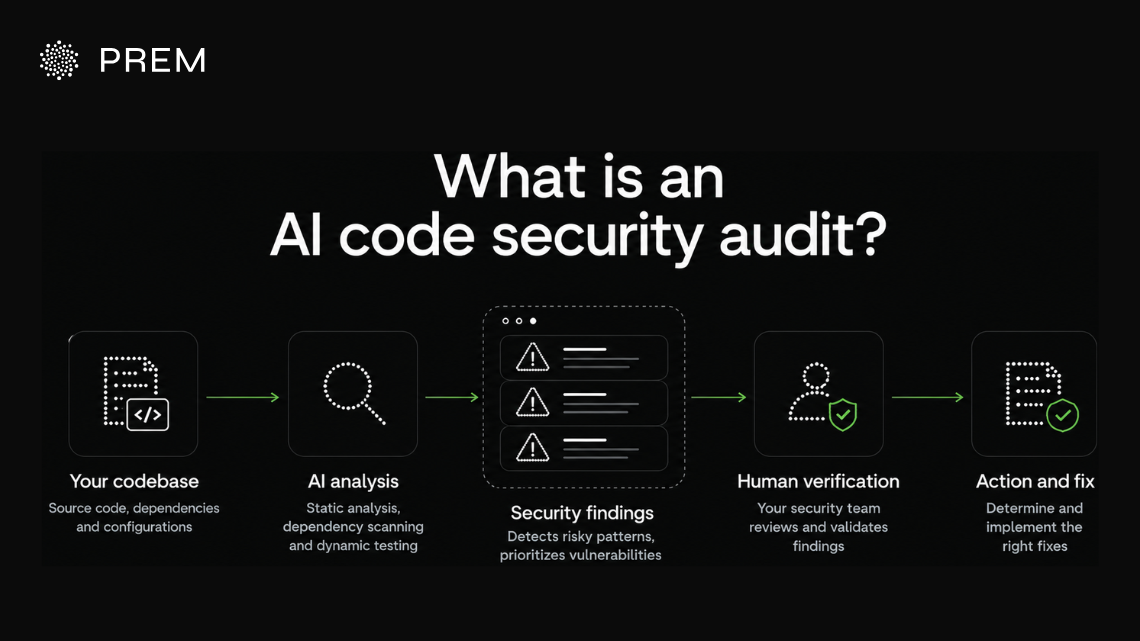
An AI code security audit uses AI-powered tools and established security-testing methods to identify vulnerabilities in your codebase. These methods include static analysis, dependency scanning, and dynamic testing. AI helps you run checks consistently and spot issues that manual reviews may miss.
AI can analyze scan results and detect risky code patterns. Your security team verifies the findings and determines the appropriate fixes.
AI code security audits vs. traditional code reviews
Traditional code reviews rely on developers to spot bugs, but reviewing every change becomes harder as your codebase grows.
AI code security audits automate checks for vulnerabilities, exposed secrets, and risky dependencies. Human reviewers assess application-specific risks, such as access-control flaws.
Combining both helps you catch common vulnerabilities and identify complex security issues.
Your App Works. Is It Leaking Data Anyway?
Prem Cyberscan checks every new commit for the security gaps that working code can hide.
Sign in with GitHubHow AI assists with code vulnerability detection
AI helps you detect vulnerabilities by analyzing code patterns and explaining security findings. Its capabilities depend on the tools you use and how they fit into your existing testing process.
Identifying risky code patterns
Static analysis tools use predefined rules to detect potentially unsafe code, as OWASP’s guide to Static Application Security Testing explains. AI can recognize patterns associated with known vulnerabilities, including cases that do not match an exact rule or signature. This gives you additional leads to investigate in your codebase.
Reducing false positives
A false positive occurs when a security tool flags code that does not contain an actual vulnerability. AI can examine the surrounding code and its context to help determine whether a finding represents a genuine risk.
Your team should validate the result because AI can misinterpret code or overlook important conditions.
Explaining vulnerabilities and suggesting fixes
AI can explain a vulnerability, describe its potential impact on your application, and suggest ways to fix it. For example, it may spot unsafe input handling in your code that could expose you to SQL injection and recommend parameterized queries, the first defense listed in OWASP’s SQL Injection Prevention Cheat Sheet. You can review the recommendation, test the change, and verify that it resolves the vulnerability, since AI can misinterpret code or suggest ineffective fixes.
Why AI-generated code needs security review
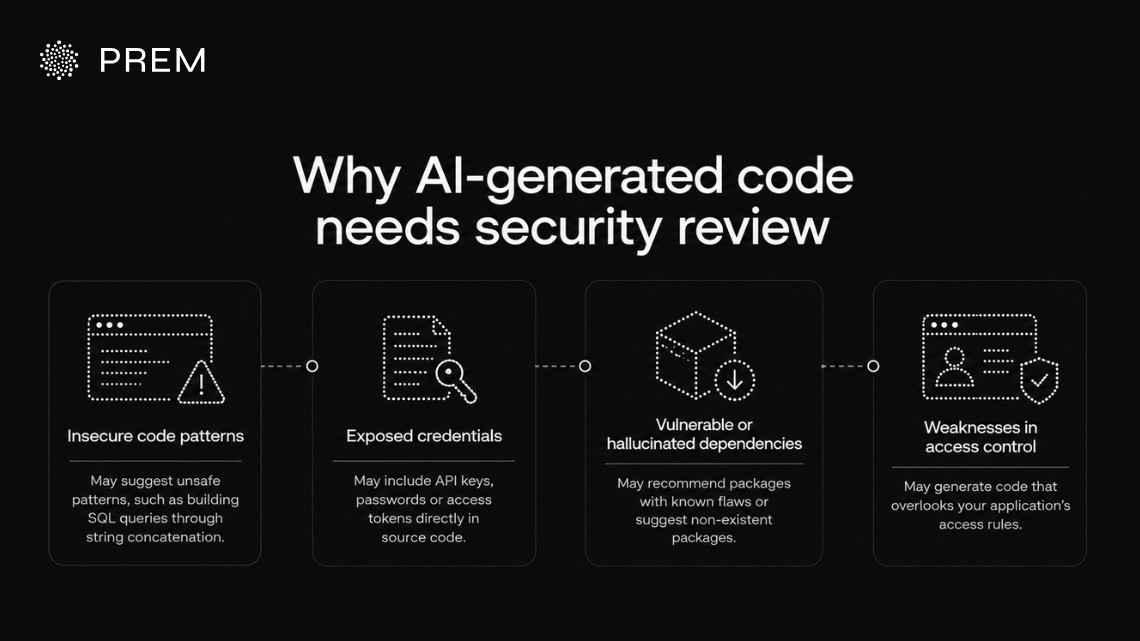
AI coding assistants like GitHub Copilot, Cursor, and Claude Code help your team write software faster. Security flaws can still appear in code that works as expected. Reviewing AI-generated code helps you identify these risks before deployment.
Insecure code patterns
AI models learn from existing code, including examples with security flaws. They may reproduce unsafe patterns, such as building SQL queries through string concatenation instead of using parameterized queries.
This can expose your application to SQL injection, a risk listed in the OWASP Top 10. Attackers can use harmful input to interfere with database queries. Review how your code handles user input and builds queries to identify these weaknesses.
Exposed credentials
AI coding assistants may suggest placing API keys, passwords, or access tokens directly in source code. A developer might also replace a placeholder with a real API key and accidentally commit it to a shared repository.
An exposed key can let others access the services it protects. Scan your code and repository history for leaked credentials, and store secrets in a dedicated secret-management tool.
Vulnerable or hallucinated dependencies
AI coding assistants can recommend packages with known security flaws or suggest packages that do not exist. A generated package name may look legitimate even when its source or authenticity is unclear.
Installing an unverified package can introduce malicious code into your application. Verify each dependency's name and source, then check for known vulnerabilities using a trusted package registry or security scanner.
Weaknesses in access control
AI tools may generate code that overlooks your application's access rules. For example, an application might confirm that a user is logged in without checking whether they have permission to view a specific record.
A user could change a record ID in a request and access someone else’s information. This is known as broken access control, and OWASP ranks it as the top web application security risk. Review your authorization checks to ensure users can access only the records and features permitted by their roles.
AI-assisted development can speed up coding, while security testing helps identify vulnerabilities before deployment. Automated tools detect common issues, and human reviewers assess risks that depend on your application's specific rules and behavior.
Core components of a continuous code security audit
Each security method targets different risks in your codebase. Combining them helps you detect vulnerabilities throughout development.
Secrets detection and SCA identify exposed credentials and vulnerable dependencies. SAST checks code for unsafe patterns, while DAST tests running applications.
Human reviewers assess business logic risks, such as unauthorized access to records. Combining automated testing with human review helps catch more security issues.
Your AI Assistant Wrote It. Who Checked It?
Prem Cyberscan gives AI-written code the same security checks as code your team writes by hand.
Sign in with GitHubWhy one-time code audits are not enough
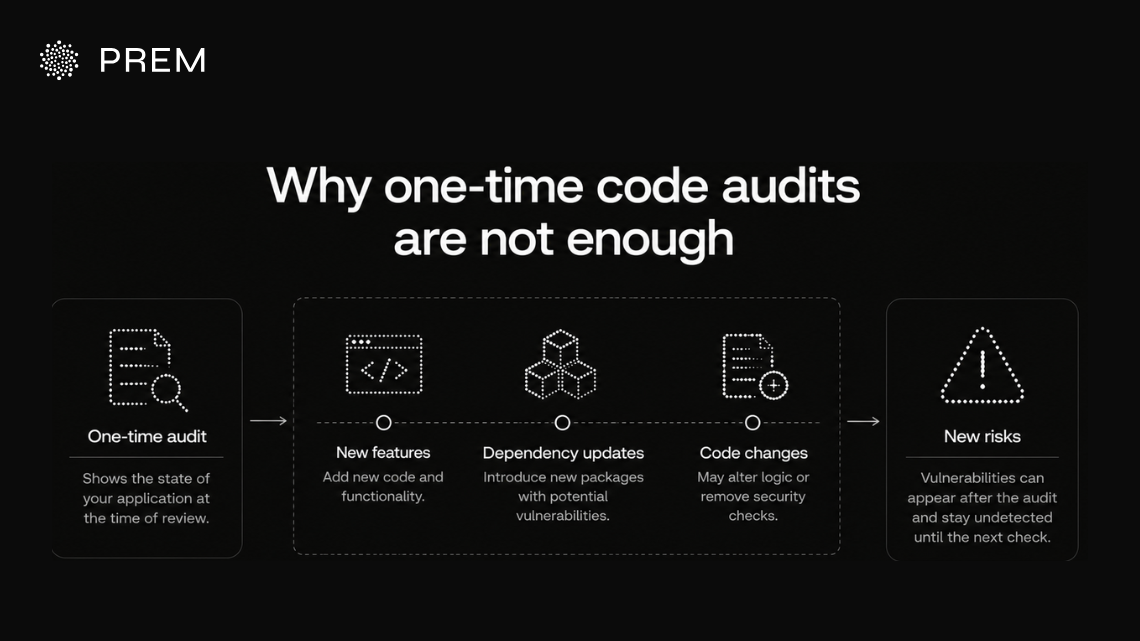
A one-time code security audit shows the state of your application at the time of review. New features, dependency updates, and code changes can introduce vulnerabilities after the audit. Those issues remain undetected until another check identifies them.
How code changes introduce new vulnerabilities
Every code change can create security risks, whether your team writes the code manually or uses an AI coding assistant.
For example, a software dependency that was safe last month may have a newly disclosed Common Vulnerabilities and Exposures (CVE) entry today. A developer could also remove an access check while modifying a function and expose sensitive data.
AI coding assistants can generate changes across several parts of an application in one session. These changes may introduce new dependencies, alter authorization logic, or add unsafe code patterns. An earlier audit cannot assess risks introduced by code changes made afterward.
Why continuous scanning matters across the development lifecycle
Continuous scanning checks code as it changes. Running security tests at different stages helps your team identify vulnerabilities before they reach production.
- Every commit: Scan for exposed credentials and known dependency vulnerabilities.
- Every pull request: Run SAST to identify potentially unsafe code before merging changes into your main branch.
- Nightly or before a release: Run DAST against a running version of your application to identify vulnerabilities that appear during execution.
Your scanning schedule depends on your application and development workflow. Aim to detect new vulnerabilities soon after they enter your codebase so your team can investigate and fix them promptly.
How to evaluate an AI code security scanner
AI code security scanners differ in what they detect and which tools they support. They also vary in how they handle source code. Use these criteria to compare your options before choosing a scanner.
| What to Evaluate | Why It Matters | Questions to Ask |
|---|---|---|
| Detection accuracy | False positives waste time, while missed vulnerabilities leave security gaps. | Does the vendor share accuracy data? How does it assess context-dependent findings? |
| Language and repository coverage | Unsupported languages or repository structures can leave gaps. | Which languages and frameworks are supported? Can it scan monorepos and multiple repositories? |
| CI/CD integration | Poor integration can slow development and lead teams to skip security checks. | Does it fit your CI/CD pipeline? Can it block merges for high-severity findings? |
| Remediation support | Developers need clear guidance to fix vulnerabilities. | Does it suggest fixes, integrate findings into your workflow, and verify fixes through follow-up scans? |
| Source code privacy and data handling | Your code may contain proprietary logic and sensitive information. | Where is it processed? Is it retained, for how long, and who can access it? |
| Reporting and auditability | Compliance teams need documented evidence of what was scanned and found | Can you export audit-ready reports? Does it log who reviewed or dismissed each finding, and why? |
Scan Interrupted? No Do-Overs Needed.
Prem Cyberscan resumes stopped scans right where they left off. New workspaces get $25 in free review credits.
Sign in with GitHubWhere continuous code security audits matter most
Continuous code security audits are especially useful when vulnerabilities could expose sensitive data, disrupt critical services, or affect multiple customers.
Financial services
According to IBM's Cost of a Data Breach Report 2026, the average cost of a financial services data breach reached $6.29 million, the second-highest among the 17 industries studied. Regular security checks help teams identify vulnerabilities in payment processing, transaction logic, and authentication as code changes.
Healthcare and regulated data
IBM's 2026 report puts the average healthcare data breach cost at $6.64 million, the highest among the industries studied. Applications that handle patient records need consistent security testing and traceable findings. Scan records help security and compliance teams document what was tested, when scans ran, and which issues were identified.
SaaS and multi-tenant applications
Broken access control remains a key risk in the OWASP Top 10. In multi-tenant systems, an authorization flaw can let one customer access another customer's data. Continuous scanning helps teams detect code changes that weaken tenant isolation or permission checks.
Teams shipping AI-assisted code at scale
According to DORA's Impact of Generative AI in Software Development report, AI adoption is associated with larger code batches, longer review times, and lower software delivery stability. Security scanning, automated testing, and code reviews help teams assess changes as AI-assisted code moves through development.
How Prem Cyberscan supports code security
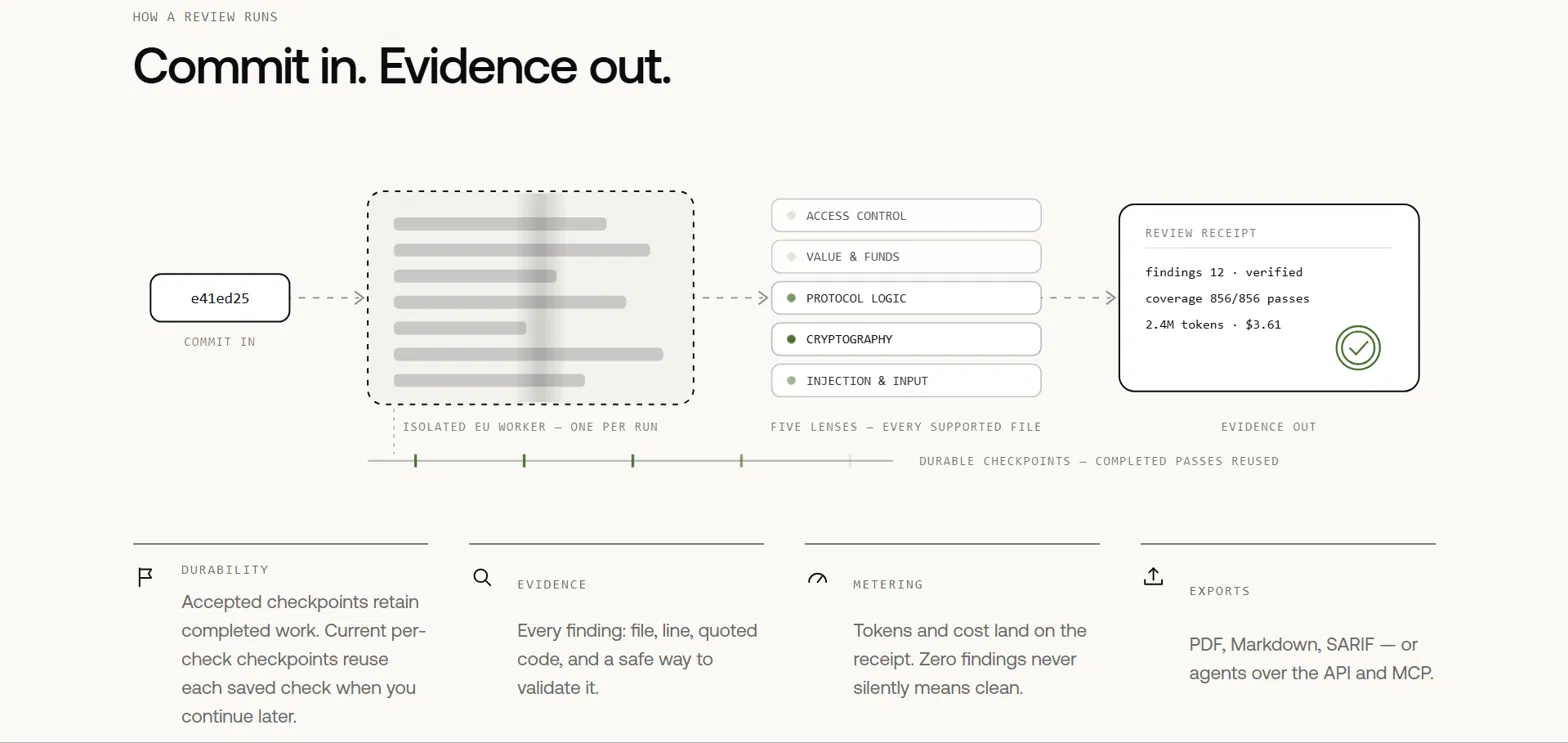
Prem Cyberscan is Prem's continuous code security audit tool. It scans your repository as code changes, helping your team track security findings beyond a single audit.
Isolated, resumable scans for each commit
When you connect a repository through the GitHub App, Cyberscan checks the specific commit in an isolated, temporary worker. If a scan is interrupted, it can resume from where it stopped instead of restarting the entire scan.
Findings with evidence and severity ratings
Each finding includes supporting evidence, file-level references, and a severity rating to help your team understand and investigate the issue. You can also select the model used for a scan, including a version of DeepSeek V4 Flash that Prem developed for security review workflows.
Dismissed findings require a reason
Your team can mark findings as false positives, non-relevant, or accepted risks. Each decision requires a reason, giving you a record of why a finding was dismissed or accepted.
API and MCP integration
Cyberscan provides an API and a local MCP adapter, allowing your team to start scans, retrieve findings, and generate reports through existing tools and workflows.
Incomplete scans need further review
An interrupted scan does not confirm that your repository is free of vulnerabilities. Check whether the scan completed before treating its results as a basis for security decisions.
Breaches Cost Millions. Finding Bugs Starts Free.
We give every new Prem Cyberscan workspace $25 in review credits to scan your code.
Sign in with GitHubKeep your production code secure with Prem Cyberscan
As your codebase evolves, new security issues can emerge and changes need to be reviewed. Continuous security checks help your team catch vulnerabilities early and address them before they reach production.
Secrets detection, SAST, SCA, DAST, and business logic reviews each cover different security risks. Running these checks regularly gives your team broader coverage throughout development.
Prem Cyberscan scans your repositories as code changes. It provides supporting evidence, file-level references, and severity ratings so your team can investigate findings and prioritize fixes.
Ready to catch vulnerabilities before they reach production? Scan your codebase with Prem Cyberscan and get $25 in review credits to try it on your own repositories. You can also sign in with GitHub to get started.
FAQs About AI Code Security Audits
What is an AI code security audit?
An AI code security audit combines established security-testing methods, such as secrets detection, static analysis, dependency scanning, and dynamic testing, with AI-assisted analysis to help identify and explain vulnerabilities. It can run throughout development as your code changes.
How does AI code vulnerability detection work?
AI-assisted detection identifies patterns associated with security risks, analyzes code in context, and helps explain scanner findings. It can help reduce false positives, but results still need validation. AI works alongside established methods such as SAST and SCA.
What is the difference between SAST and DAST?
SAST analyzes source code without running the application, helping identify issues such as injection risks and insecure cryptography. DAST tests a running application by sending requests and examining its responses to identify vulnerabilities that appear during execution.
What types of vulnerabilities can code security audits detect?
Depending on the tools used, audits can identify exposed secrets, vulnerable dependencies, injection flaws, insecure cryptography, and access control weaknesses. Business logic flaws may require manual review because their detection depends on understanding your application's rules and workflows.
Can AI code security scanners fix vulnerabilities automatically?
Some scanners suggest fixes or generate patches for detected vulnerabilities. Developers should review and test these changes before merging them to confirm that the fix addresses the underlying issue without introducing new vulnerabilities or breaking existing functionality.
How often should enterprises audit their source code?
Run secrets detection and dependency scanning on every commit or pull request where practical. SAST can run during pull request reviews, while DAST often runs on a schedule or before releases. Adjust scan frequency to your development workflow, application risk, and tool capabilities.
How can enterprises protect proprietary code during AI security audits?
Before connecting a repository, confirm where code is processed, how long it is retained, who can access it, and whether it is used for model training. Review encryption, access controls, deletion policies, and any relevant contractual or compliance requirements.