AI Threat Detection for Enterprises: How AI Detects, Prevents and Responds to Cyber Threats
On this page
AI threat detection helps your enterprise spot suspicious activity across endpoints and cloud systems as well as identity tools and business apps. It connects signals that may look harmless on their own and helps your team see which threats need attention first.
AI also helps you prevent and respond to cyber threats by giving your team more context before an attack spreads.
- Spot unusual behaviour before it reaches sensitive systems
- Find vulnerabilities before attackers reach your code
- Prioritize the threats and weaknesses that matter most
- Automate routine responses while keeping critical decisions with your team
At Prem AI, we built Prem Cyberscan to bring this same approach into your codebase. You connect your GitHub repository and Cyberscan reviews your code for vulnerabilities and possible attack paths. Your developers get prioritized findings with severity and file-level evidence.
New Cyberscan workspaces also get $25 in review credits, so you can start with one GitHub repository and see how Cyberscan works on your own code.
In September 2026, Microsoft shared a case where Defender stopped a business email compromise attack within four minutes. The attacker used device code phishing to take over a user account. Defender connected activity across identity and email systems before the attacker could set up inbox rules or attempt payroll fraud. Microsoft’s Defender case study explains how the attack was detected and stopped.
This type of attack is also becoming more common across businesses. According to Dark Reading’s EvilTokens report, Microsoft disrupted an AI-powered phishing service that had compromised more than 12,000 inboxes across 10,000 companies worldwide.
Your security team may not get one clear warning when an attack starts. It could begin with an unusual login and then move into email or other systems your business depends on. AI threat detection helps your team connect those signals before the attack goes further. It also helps you focus on the activity that needs attention first and respond before sensitive systems or data are exposed.
How does AI detect cyber threats across your enterprise?
Here is how AI picks up threats across your enterprise, from the data it reads to the alerts it puts in front of your team.
| Detection layer | How it works across your enterprise | What this means for your security team |
|---|---|---|
| Security data across your environment | Activity from endpoints and cloud systems is brought together with signals from business apps and identity tools. Network activity also adds more context around what is happening across your environment. | Your team gets a broader view of security activity without having to check every system on its own. |
| Normal user and system behaviour | Login patterns and device use help build a picture of what day-to-day activity usually looks like. Access to files and applications also becomes part of that baseline. | Your team has a clearer reference point when something starts to look unusual. |
| Activity that breaks the usual pattern | A single unusual login may not be enough to raise concern. The risk becomes clearer when that same account asks for admin access or starts opening sensitive files. | Your analysts get more context around suspicious behaviour instead of reacting to one isolated event. |
| Signals connected across different systems | Events from identity tools and endpoints can be linked with activity inside your cloud environment. This helps show whether separate alerts belong to the same attack. | Your team can follow one possible attack path instead of investigating several disconnected warnings. |
| Threats ranked by level of risk | Higher-risk activity is pushed to the top while lower-risk alerts can be grouped together. The priority changes based on what happened and which systems or users are involved. | Your security team spends less time sorting through noise and more time on the threats that need attention first. |
How AI helps you prevent cyber threats before they cause a breach
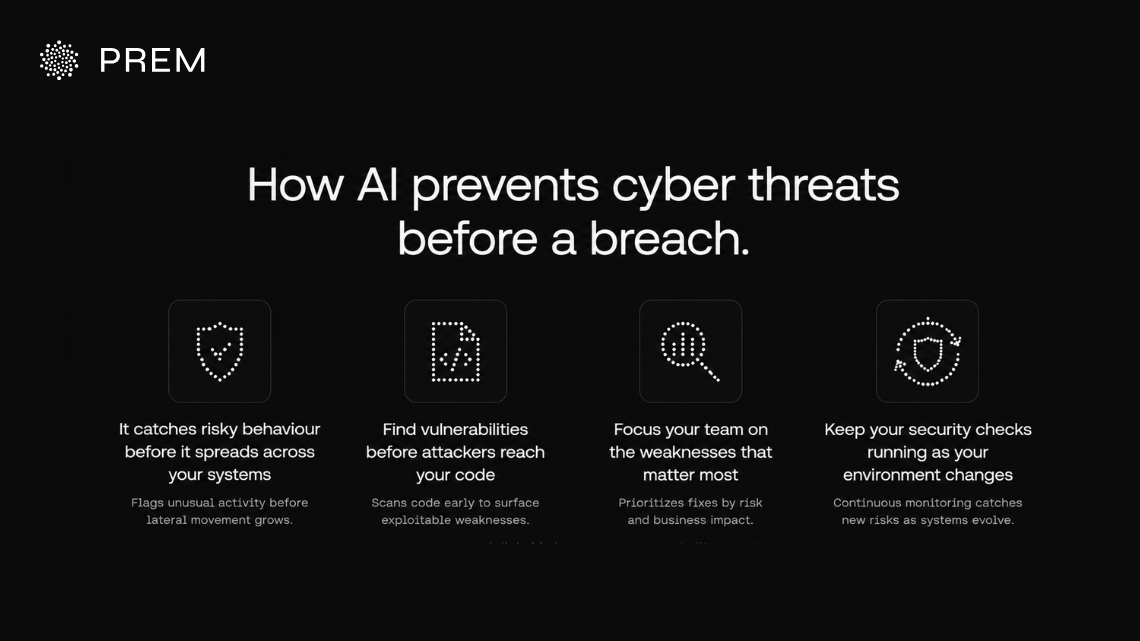
These are some of the ways AI helps you prevent cyber threats before they cause a breach. It gives your team earlier warning signs and helps you act on the risks that matter most.
It catches risky behaviour before it spreads across your systems
AI can pick up unusual logins or sudden permission changes before the activity reaches more sensitive parts of your environment. That speed matters because attackers are moving faster than ever.
CrowdStrike highlighted in its 2026 Global Threat Report post that attackers now reach other systems within 29 minutes of breaking in on average. AI gives your team more time to check what is happening and stop the attacker before they get that far.
🚨 The CrowdStrike 2026 Global Threat Report is here. In the age of AI, even less sophisticated threat actors can execute complex attacks, and advanced adversaries have become dramatically more dangerous. This year’s report exposes the latest tradecraft of the evasive adversary, who is supercharging attacks with AI and posing an unprecedented threat. Attacks by AI-enabled adversaries increased by 89% in 2025. The average eCrime breakout time plummeted to just 29 minutes. That’s a 65% increase in speed from 2024. And with adversaries using AI to accelerate their attacks and move fluidly across domains, they are evading detection more effectively than ever. Get the latest threat intel findings here: https://t.co/7wCQekNVBu
— CrowdStrike (@CrowdStrike) February 24, 2026
Find vulnerabilities before attackers reach your code
Your applications can carry weaknesses that stay hidden until someone starts looking for them. AI-assisted code review helps your team scan more of your code and surface vulnerabilities earlier so developers have a chance to fix them before they are exploited.
Focus your team on the weaknesses that matter most
Not every vulnerability creates the same level of risk for your business. AI can help your team look at the severity of a weakness and the systems it affects so the most important fixes move to the top instead of getting buried in a long list.
Keep your security checks running as your environment changes
Your cloud setup changes over time and new software keeps getting added. Continuous monitoring helps your team keep checking for new weaknesses instead of depending only on a security review that happened weeks or months ago.
The gap between a flaw appearing and attackers using it has almost disappeared. VentureBeat's Patch Tuesday analysis points to Mandiant data showing that attackers now exploit vulnerabilities about seven days before a patch is even released, which is why a monthly or quarterly review leaves your systems exposed for far too long.
See what AI threat detection looks like inside your codebase
Prem Cyberscan helps you find vulnerabilities in your GitHub repository before they turn into bigger security risks.
Sign in with GitHubHow does AI respond when it detects a cyber threat
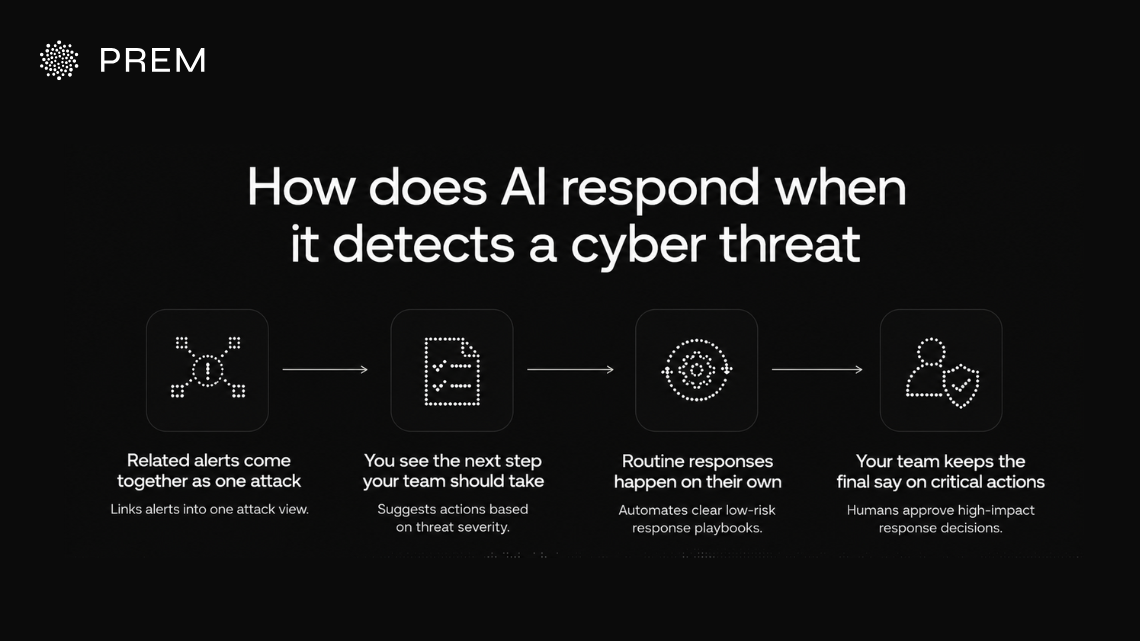
Once AI spots a threat, the next job is to help your team understand what happened and act fast. Here is what that looks like after an alert goes off.
Related alerts come together as one attack
A single attack can trigger alerts across your email, identity and endpoint tools. AI connects those alerts when they point to the same user or device. Instead of making your team open several separate tickets, it brings the activity together in one place so the full attack is easier to follow.
You see the next step your team should take
AI can suggest the next action based on what it finds and how serious the threat looks. Your analysts can then review that suggestion before anything happens.
| What AI finds | What AI suggests |
|---|---|
| A stolen account signing in from a new location | Block access and reset the password |
| A laptop running malware | Isolate the device from your network |
| A phishing email sitting in many inboxes | Remove it from every mailbox |
| A user account acting outside its normal pattern | Open an investigation into the account |
| Data moving to an unknown cloud location | Stop the transfer and review who started it |
Routine responses happen on their own
Some actions are simple enough to automate when the risk is clear. That could mean removing a known phishing email or blocking a sign-in from a known bad IP address.
Your team can set these actions in advance through response playbooks. The NIST incident response guidance also recommends planning response steps before an attack happens so your team is not making every decision under pressure.
Your team keeps the final say on critical actions
Some actions still need a person to approve them. Shutting down a production system or locking an important account can affect your business if the decision is wrong.
A Cloud Security Alliance report found that only 14% of security leaders allow AI to take remediation actions without a human in the loop. AI helps your team move faster, but your people still make the decisions that carry the most risk.
See what AI threat detection looks like inside your codebase
Prem Cyberscan helps you find vulnerabilities in your GitHub repository before they turn into bigger security risks.
Sign in with GitHubHow AI threat detection works from detection to response
AI threat detection moves from reading security activity to helping your team decide what needs action. Here is the full flow in one view.
| Stage | What happens | What your team gets |
|---|---|---|
| Security data comes in | Activity from your users and systems is collected across your environment. | A wider view of what is happening across your business. |
| AI looks for unusual activity | Patterns are checked against normal behaviour and known signs of attack. | Suspicious activity becomes easier to spot. |
| Risk is assessed | The activity is reviewed based on how serious it looks and what it affects. | Higher-risk threats move to the top first. |
| The threat is investigated | Related activity is connected to show what happened and where the attacker may have moved. | Your analysts get more context without rebuilding the attack by hand. |
| A response is prepared | The system can suggest or trigger actions based on rules your team has already set. | Your team can respond faster when the threat is clear. |
| Your team reviews critical actions | High-impact decisions stay with your security team. | You keep control over actions that could affect important systems or data. |
This same approach is also useful before a threat reaches your live systems. Your code can carry vulnerabilities long before they show up as suspicious activity in your environment. At Prem AI, we have Prem Cyberscan to help your team catch those weaknesses earlier.
It reviews your repositories in context and looks at possible attack paths as your code changes. Your developers get prioritized findings with severity and file-level evidence so they can see where the issue is and decide what needs attention first.
Keep checking your code as your enterprise keeps changing
Prem Cyberscan gives you ongoing AI-assisted review between formal audits so new weaknesses do not stay hidden.
Review Your GitHub RepositoryWhat should you consider before using AI threat detection in your enterprise
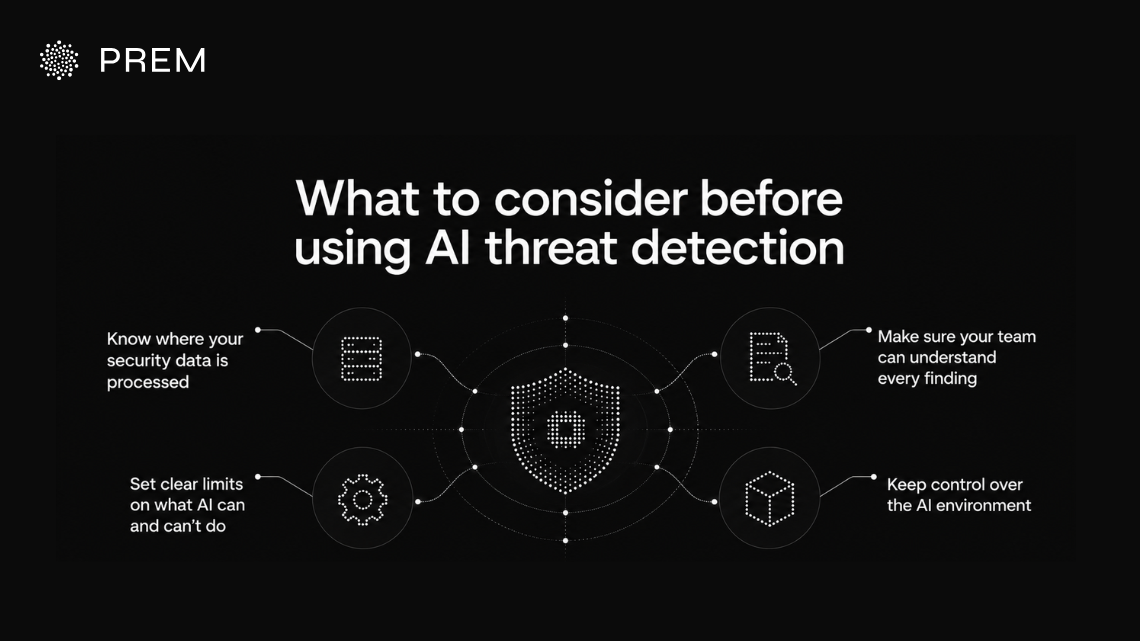
Before you add AI to your security workflow, you need to know what happens to your data and how much control your team keeps. These are some of the main areas to check before you move ahead.
Know where your security data is processed
Your security logs can contain internal system details and account information that you may not want leaving your environment. You should know where that data goes and which systems can access it before you connect it to an AI model.
This risk already shows up inside security teams. According to IBM’s report on shadow AI in the SOC, analysts can expose internal hostnames or account details when they paste security data into AI tools that their company has not approved.
Make sure your team can understand every finding
Your analysts need more than an alert that says something looks dangerous. They should be able to see what triggered the finding and which systems were involved so they can decide whether the threat needs action.
Clear evidence also makes it easier to check whether AI got something wrong. Your team should always have enough context to review a finding instead of trusting the model on its own.
Set clear limits on what AI can do on its own
You need to decide which security actions AI can handle and which ones still need approval. Routine work may be safe to automate while actions that affect important accounts or production systems should stay with your team.
Splunk’s Agentic SOC example followed this approach in practice. AI handled tasks such as triage and investigation while analysts kept control over validation and response decisions.
Keep control over the AI environment behind your security tools
Your team should know which models are being used and what those models can access. You also need clear controls around the infrastructure that processes your security data.
Palo Alto Networks’ AI security guidance highlights the same need for visibility and controlled access as AI systems take on more actions across enterprise environments. Keeping that control makes it easier for your team to know what AI can reach and what it is allowed to do.
Run Prem Cyberscan on your own GitHub repository
New Cyberscan workspaces get $25 in review credits so you can see how it works on your own code.
Sign in with GitHubBring AI threat detection into your enterprise codebase with Prem Cyberscan
By now, you have a clear idea of how quickly a small weakness can turn into a serious security problem. Your code keeps changing between formal audits, so new vulnerabilities can appear long before the next review happens.
That is exactly why we built Prem Cyberscan at Prem AI. You connect your GitHub repository and Prem Cyberscan reviews your code in context. It looks for potential vulnerabilities and possible attack paths while your code continues to change.
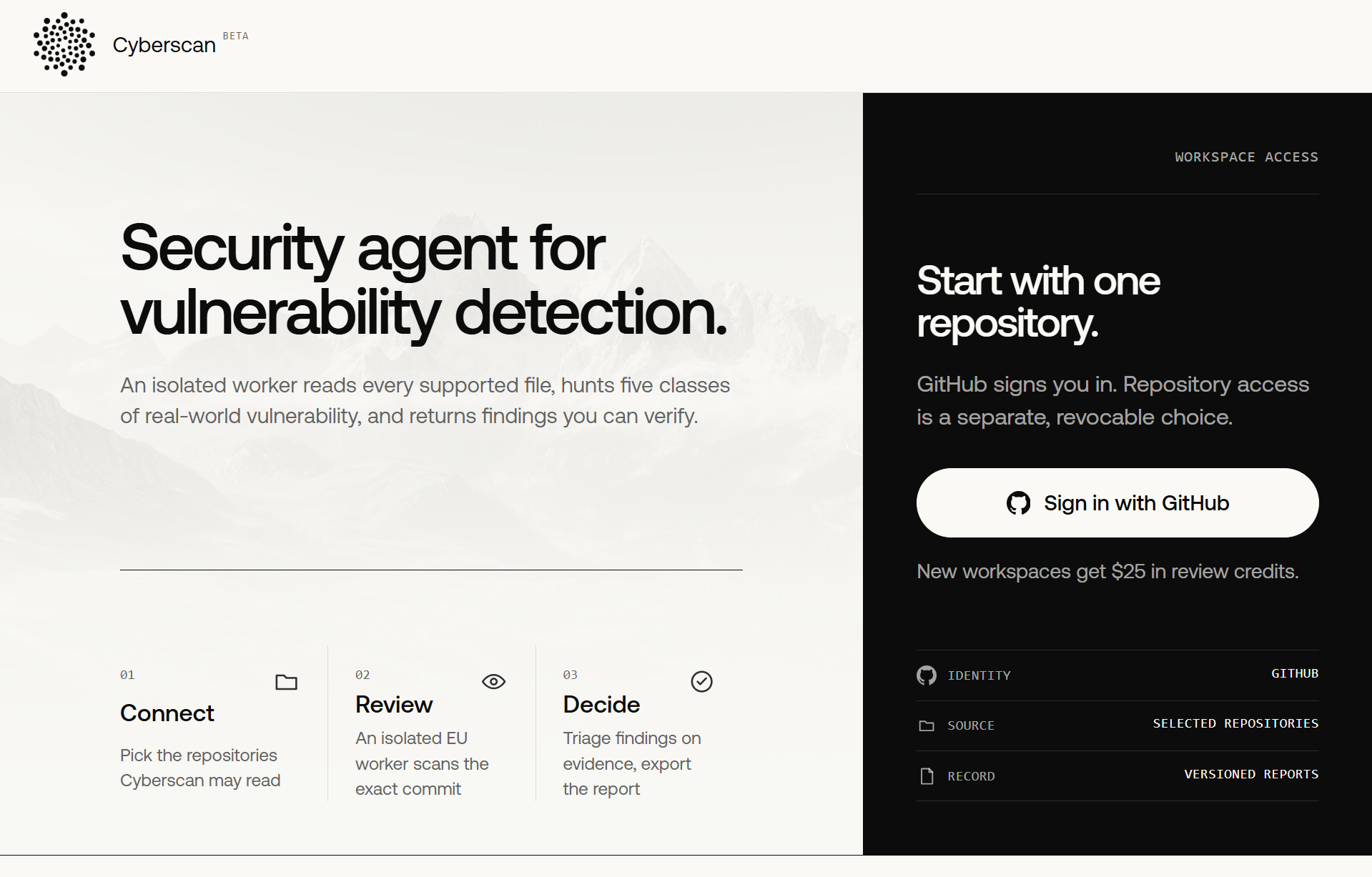
Your team gets prioritized findings with severity and file-level evidence so developers know where to look first. Sign in with your GitHub account, connect a repository, and let Prem Cyberscan run.
We also provide new Cyberscan workspaces $25 in review credits, so you can start with one GitHub repository and see how Cyberscan works on your own code. Use it to find critical vulnerabilities earlier and reduce the security risks that could later turn into bigger threats for your enterprise.
Frequently asked questions about AI threat detection
What is AI threat detection?
AI threat detection uses machine learning and AI models to review security activity across your systems. It looks for unusual behaviour and patterns that may point to an attack. Your security team gets more context around suspicious activity so they can investigate the threats that need attention first.
How does AI detect cyber threats in your enterprise?
AI looks at activity across your endpoints and cloud systems along with identity tools and business applications. It learns what normal behaviour looks like and flags activity that breaks those patterns. It can also connect separate alerts so your team sees a possible attack instead of several unrelated warnings.
How does AI help prevent cyber threats?
AI helps your team spot risky behaviour before an attacker moves further through your systems. It can also surface vulnerabilities and unusual access patterns earlier. This gives your security team more time to investigate the risk and fix weaknesses before they lead to a larger security problem.
Can AI respond to cyber threats automatically?
Yes. AI can automate some predefined security actions when the risk is clear. This can include blocking suspicious access or removing known phishing emails. Your team should still keep human approval for actions that could affect important accounts or production systems so critical decisions remain under your control.
How does Prem Cyberscan support AI threat detection?
Prem Cyber Scan focuses on the risks that can already exist inside your code. It reviews your repositories and looks for vulnerabilities that could later become attack paths. Your developers receive prioritized findings with severity and file-level evidence so they can understand the issue and fix it earlier.
Does Prem Cyberscan replace a security audit?
No. Prem Cyber Scan is designed to work between formal security audits rather than replace them. Your code keeps changing after an audit is complete. Continuous AI-assisted review helps your team find new weaknesses as they appear so you are not waiting for the next audit to catch them.
Why does continuous code scanning matter for your enterprise?
Your applications change whenever developers add features or update dependencies. Each change can introduce a new weakness that was not present during the last audit. Continuous scanning gives your team ongoing visibility into those changes and helps you catch critical vulnerabilities before attackers have a chance to use them.