Why Private AI Must Run Locally to Keep Enterprise Data, Models and Compliance in Your Control
On this page

Private local AI means you run AI on infrastructure you control, so your prompts and data are processed in your own environment.
- You decide where your AI runs and who can access your models, prompts, and outputs. This helps you protect sensitive business data and meet data residency rules.
- You can pick the setup that fits your team: your own servers (on-premises), a private cloud or VPC, an air-gapped environment, or confidential computing, which protects your data with special hardware while the AI works on it.
- Before you choose a setup, check where your AI is processed and stored, who can access your data, and whether your team can verify the security controls yourself.
- With Prem’s Enclave API, you send your requests to an OpenAI-compatible endpoint, and Prem runs the servers for you. Your data is processed inside a hardware-isolated environment (TEE), and your security team can review cryptographic proof (attestation) of that environment.
- If you’re in Lugano for Plan ₿ Week, Prem AI is hosting Prem Unveiled on 23 October, a first look at upcoming products built around this same approach to local, verifiable AI.
In June 2025, Business Insider reported that at least 85 confidential client documents held by Scale AI were publicly accessible through Google Docs. Some could even be edited by anyone with the link. The files included materials linked to Meta, Google, and xAI.
Just weeks earlier, Meta had announced a $14.3 billion investment in Scale AI. Scale AI disabled public sharing the day the story broke, but the documents had already been exposed.
For your business, this raises an important question: how much control do you have over your data once it leaves your infrastructure? Even strong internal security controls cannot eliminate risks introduced by external systems or a single sharing misconfiguration.
Local AI gives you full control over where your data is processed and how it is handled. Prem AI already offers confidential inference through the Enclave API, and we’re building even more to bring private, local AI to enterprises. Here’s a sneak peek at what’s coming.
We’re opening the doors to Prem HQ in Lugano, and giving a small group a first look at what comes next. Prem Unveiled brings together our work on local AI and confidential compute, along with our latest product. We want you to have a say in where your AI runs and how your data is handled, and this is a chance to see the work behind that commitment. Join us for the live unveiling, try the products and speak with the researchers and engineers building them. Guests will also receive early access to upcoming releases, with aperitivo and live music to close the evening. 23 October · 16:30–20:30 CEST · Lugano Places are limited and attendance is subject to approval. We look forward to welcoming you to our home in Lugano and sharing this next step for Prem with you in person.
— Prem (@premai_io) October 14, 2026
So, what does running AI locally involve, which deployment options are available, and how can you protect sensitive enterprise data? Let’s get into it.
What is local AI and how does it work?
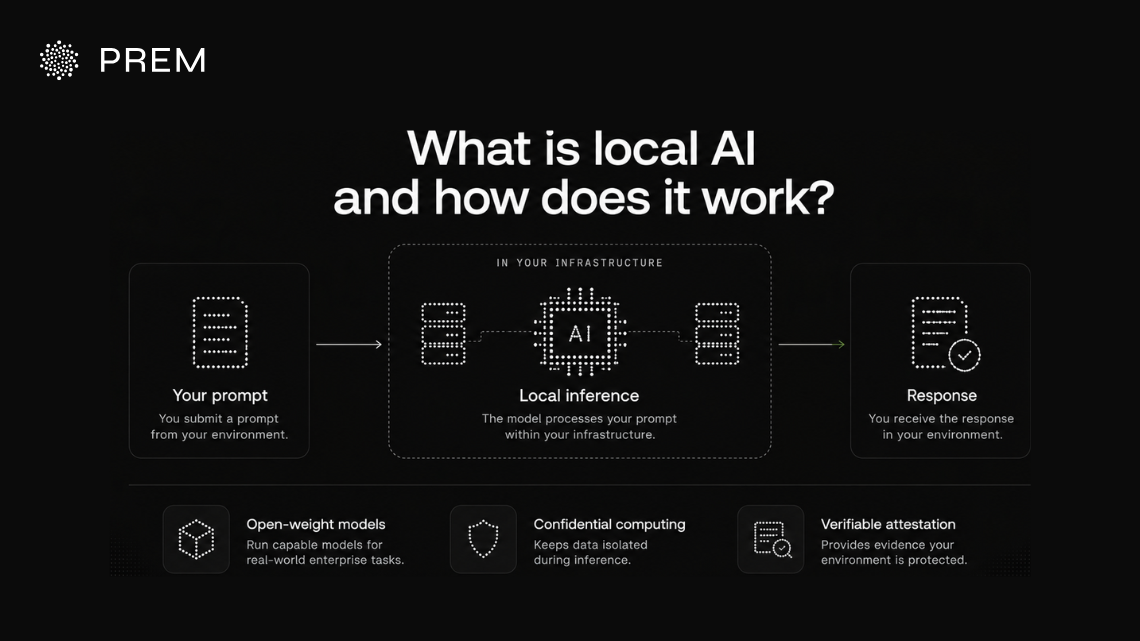
Local AI means running inference on infrastructure you control. When you submit a prompt, the model processes it in your own data center or a private environment you manage. This gives your organization control over data access, processing, and retention.
How local inference works
With cloud-based AI, your prompt travels to the provider's servers for processing before the response returns to you. With local AI, the model processes your prompt within your chosen environment. This can reduce dependence on external infrastructure and give your organization control over how data is handled.
What makes local AI possible today?
Three developments have made local AI more practical for enterprise workloads.
Together, these capabilities give enterprises more options for running AI with more ownership of their data and infrastructure.
Confidential computing is gaining traction across enterprise environments.
A 2025 IDC study of 600 IT leaders across 15 industries found that 75% of surveyed organizations were using or piloting the technology. This growing adoption reflects enterprise interest in protecting sensitive data while it is being processed.
Local AI vs. self-hosted AI vs. on-premises LLMs
These terms describe different aspects of an AI deployment. Understanding the differences helps you choose the right setup for your business.
On-premises and self-hosted AI can both fall under local AI. The main difference is how much of the infrastructure your team manages and where it is located.
For most enterprises, the right setup depends on your data-protection requirements and operational capacity. The next section breaks down each deployment path in more detail.
Before choosing a deployment, establish where your data will be processed and who can access it. Then verify that the architecture and security controls meet your requirements.
Sensitive Data in Your Prompts?
Enclave API gives your private AI local-level control. Your prompts are processed inside sealed hardware that even Prem’s operators can’t access.
Try Enclave APIWhy enterprises run AI locally for data privacy and control
When your business uses AI, the data going into each prompt can be just as sensitive as the final output. Local AI lets you decide how your data is processed, who can access your models, and where your workloads run.
Protect sensitive business data and prompts
A support ticket may contain customer details. A code review may reveal unreleased product logic. A document summary may include confidential client terms.
When you send this information to a cloud AI service, it reaches the provider's infrastructure for processing. How the provider handles your data depends on its technical controls, retention practices, and access policies. The Scale AI incident shows how a configuration mistake can expose confidential documents.
Running AI locally lets you keep inference within an environment you control. With the right setup, you can reduce external data exposure and enforce your own data-handling policies.
Control access to models and proprietary data
Your AI models may work with trade secrets, internal research, or proprietary training data. You need clear controls over who can access these assets and how they are used.
With local deployment, your team can manage model access, protect stored model weights, and define how training data is handled. You can also monitor usage through access logs and permissions tailored to each role.
This gives your organization more direct control over its AI assets and helps protect the business knowledge behind them.
Manage data residency and compliance requirements
Your business may need to keep certain data within a specific jurisdiction or restrict who can access it. Under Article 44 of the GDPR, transfers of personal data outside the European Economic Area must meet the GDPR’s requirements for international data transfers. Healthcare and financial services may also face additional requirements depending on the jurisdiction and use case.
For AI systems operating in the EU, the EU AI Act also introduces governance and documentation requirements based on a system’s risk classification, which can shape where and how AI workloads should run.
Local AI can help you meet these requirements by giving you more control over where inference takes place and how data moves between systems. You still need to verify the deployment's actual data flows and security controls to establish whether it meets your obligations.
That evidence also helps your compliance team document the setup and support audits.
Which local AI deployment option fits your enterprise?
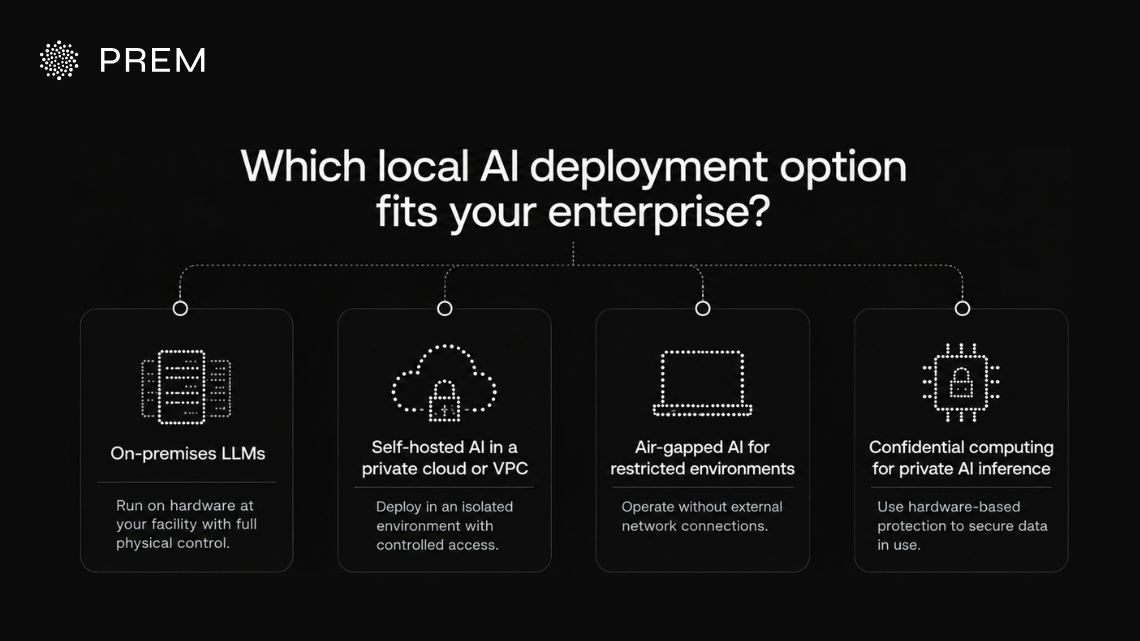
Your local AI setup depends on your data protection needs and the infrastructure your team can manage. Some deployments give you direct control over physical hardware, while others rely on isolated cloud environments or hardware-based protections.
On-premises LLMs
An on-premises LLM runs on hardware located at your organization's facility. Your team controls the physical environment and manages the infrastructure used for inference.
This setup can suit government agencies and other organizations with strict physical security requirements. Your team must also handle hardware procurement, maintenance, upgrades, and scaling.
Self-hosted AI in a private cloud or VPC
A private cloud or virtual private cloud (VPC) lets you deploy and manage AI within an isolated cloud environment. You retain control over access permissions and deployment settings while the cloud provider manages the underlying hardware.
This can suit enterprises that need control over their AI workloads without operating their own data center. A VPC provides network isolation, so your team still needs to configure and verify the security controls protecting the workload.
Air-gapped AI for restricted environments
An air-gapped AI deployment operates without a connection to external networks. This limits exposure to remote access and external network threats.
Air-gapped environments can suit defense organizations and critical infrastructure operators with strict connectivity restrictions. Your team must plan how to transfer approved updates and patches into the environment securely.
Confidential computing for private AI inference
Confidential computing uses hardware-based Trusted Execution Environments (TEEs) to protect data while it is being processed. Depending on the implementation, these protections can help prevent the host system or infrastructure operator from accessing sensitive information during inference.
This can help enterprises protect sensitive AI workloads even when they rely on third-party infrastructure. Hardware attestation can provide verifiable evidence about the protected environment, which your security team can assess against approved configurations.
Confidential computing protects data while it is being processed. Your team still needs appropriate controls for data storage, access, model integrity, and the surrounding infrastructure.
Before You Buy GPUs, Catch Your $20 First
Enclave API gives your private AI local-level protection on servers Prem runs for you. Grab $20 in free credit to test it.
Claim Your $20 CreditWhat does it take to run AI locally at scale?
Running a model locally for a pilot is one thing. Supporting hundreds of users and production workloads takes more planning. Your team needs to account for compute capacity, ongoing maintenance, security controls, and the total cost of running the system.
GPU capacity and inference performance
Your hardware needs to match your workload. A single GPU may support light usage, while multiple teams and production applications may require more compute capacity to handle peak demand.
Model size also affects performance and cost. Larger models generally require more memory and computing power. Test models against your actual workloads to find the right balance between response speed, output quality, and infrastructure costs.
Model updates, monitoring and maintenance
Your team is responsible for maintaining a locally deployed model. This includes evaluating new versions, testing changes against your use cases, and rolling out updates safely.
You also need to monitor latency, error rates, and usage patterns. Regularly patch the underlying infrastructure and runtime to keep the deployment reliable and secure.
Access controls, auditability and data retention
Local deployment lets you manage access and data handling. You still need clear user permissions, activity logs, and retention policies that reflect your business and compliance requirements.
As adoption grows, review permissions regularly and assign clear ownership of these controls. This helps your team track model usage and investigate incidents when they occur.
Infrastructure costs and total cost of ownership
The cost of running AI locally includes more than GPUs. Your budget should account for power, cooling, networking, storage, and the engineering time needed to maintain the system.
Local infrastructure often requires a larger upfront investment, while hosted APIs typically charge based on usage. High and consistent workloads may help justify that investment. Estimate your expected usage and ongoing operating costs before choosing a deployment model.
How to evaluate a private local AI solution
Before choosing a deployment, use these checks to assess how well a solution protects your data and meets your security requirements.
Use the answers to identify gaps before deployment. Ask for evidence where possible, and document any controls your team needs to configure or manage itself.
But not all evidence carries the same weight. A vendor’s audit log is only as trustworthy as the vendor who writes it. Here’s why hardware-signed evidence is more reliable.
Sovereign AI, continued. Today: what counts as evidence when a regulator asks how your AI vendor handled your data. For any regulated business running AI on sensitive data, one compliance conversation is inevitable. Sooner or later, a regulator, an auditor, or a patient's lawyer will ask how you verified what actually happened with the data. For most enterprises, the answer starts with the vendor's own audit log. Audit logs tell you when something happened, who was on the account, and what action was taken. Enterprises have used them as compliance evidence for decades, and in most software categories they hold up. They come with a specific weakness that becomes urgent when the data is a patient record, a court filing, or a financial position that would move markets if it leaked. The vendor writes the log, stores it, and has an interest in what it says. If the person at the vendor with access to your data is also the person who could quietly edit the log claiming they did not, the log has stopped being independent evidence. At Prem, we do not think that is enough for the kind of data our customers handle. If a hospital is going to run AI on patient records, or a bank on customer transactions, the evidence that the vendor stayed out of the data has to come from somewhere with no stake in the answer. Cryptographic attestation is what that looks like in practice. When a workload runs inside a confidential-compute enclave, the chip itself produces a signed report of what code ran, what firmware was loaded, and what hardware carried it. The signing key is embedded in the silicon by the chip manufacturer, cannot be extracted by the vendor, and cannot be forged. The report is delivered to your device, where it is verified against a public reference before any of your data is allowed to move. An audit log is what the vendor tells you. An attestation is what the hardware shows you. Prem is built around that difference. More on sovereign AI to come.
— Prem (@premai_io) July 22, 2026
How Enclave API supports private, local enterprise AI
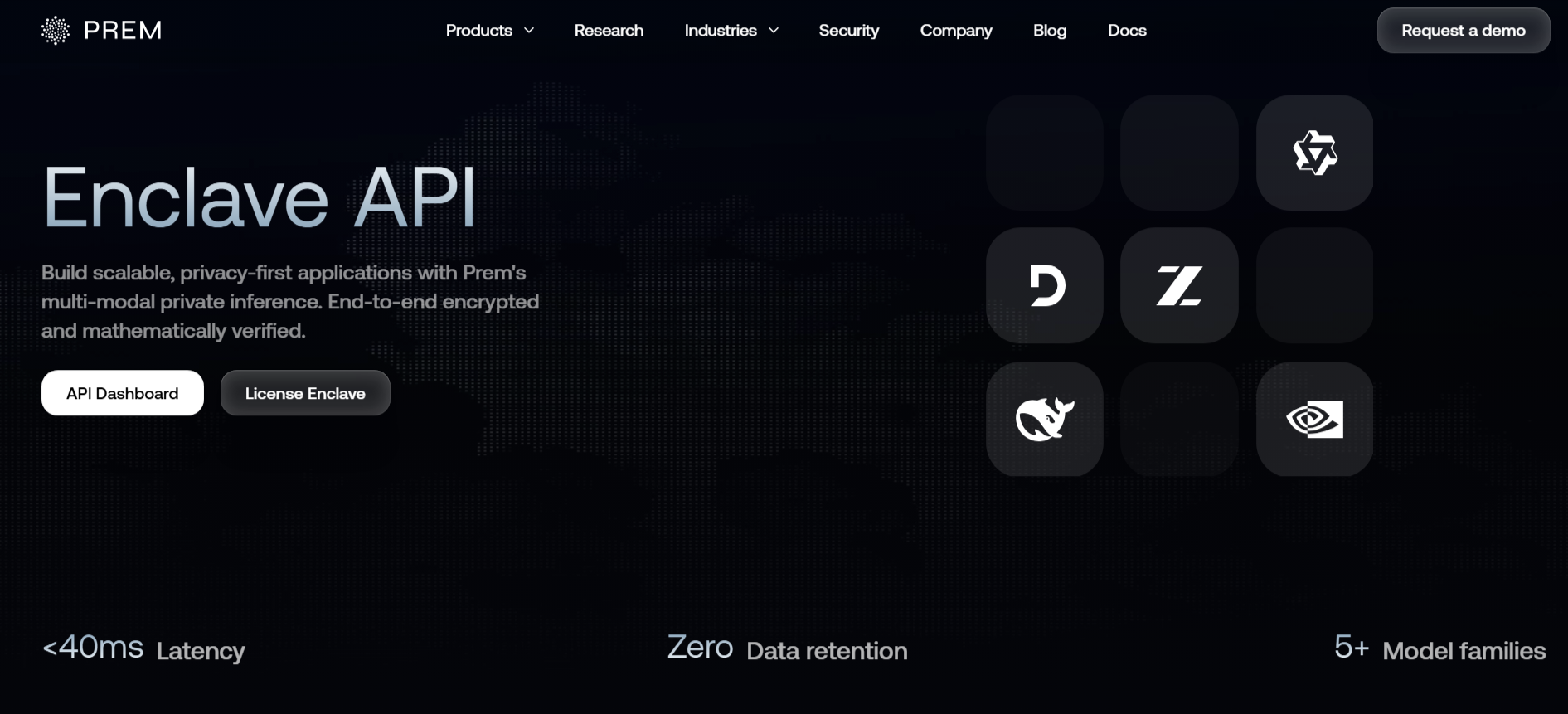
Enclave API is Prem’s confidential-inference product. It gives enterprises hardware-isolated inference through a hosted OpenAI-compatible endpoint, without managing the underlying infrastructure. It’s the hosted route to the confidential-computing option covered earlier in this blog.
Your prompts are processed inside a Trusted Execution Environment (TEE). Your security team can inspect cryptographic attestation to verify aspects of the protected environment.
Here’s how a request moves through Enclave API and where your data stays encrypted along the way.
If you’re building AI features that use private code, client documents or any sensitive data, you need to know where that information can be read while the model works with it. We don’t use your API prompts or responses to train models. With Prem’s Enclave API, the TypeScript SDK or local Confidential Proxy encrypts your request before sending it to our gateway. The gateway uses metadata, such as model choice and request size, to handle the call while the contents remain encrypted. On supported confidential routes, the request is decrypted inside a hardware-isolated enclave for inference. The hardware is designed to restrict the host’s access to the data while the model processes it. This limits where the sensitive content is readable, including keeping it encrypted as it passes through our gateway.
— Prem (@premai_io) October 5, 2026
The Scale AI incident shows how gaps in data handling and access controls can expose confidential information. Attestation provides evidence about the protected environment, but it does not establish that every part of a deployment is secure.
Check whether the report matches your approved configuration. Also review access controls, data retention, and the systems surrounding inference. Beyond data-in-use protection, this gives your compliance team verifiable evidence for audits.
Enclave API reflects this approach today, and Prem’s team continues to expand the toolkit around the same principle: verifiable control over where your local AI runs and how your data is handled.
Don’t Take Our Word for It. Take Our $20 Instead.
Test Enclave API yourself and review the attestation evidence behind your private AI. You get local-level control plus $20 in free credit.
Claim Your $20 CreditKeep enterprise AI under your control with Prem AI
Your AI deployment should match how sensitive your data is and how directly your team needs to manage it. Sensitive prompts and regulated workloads need security controls you can actually verify.
Looking at private AI for sensitive workloads? Enclave API runs your inference in hardware-isolated environments, with attestation your team can check directly, so you can start building with Enclave API right away.
Also, if you’re in Lugano for Plan ₿ Week, the annual gathering focused on Bitcoin and financial freedom, Prem AI is conducting Prem Unveiled on 23 October, and you can request an invite. It’s your chance to get a first look at upcoming products built around local, verifiable AI.
FAQs about local and private AI
What is local AI?
Local AI runs inference on infrastructure your organization controls, such as on-premises hardware or a private cloud environment. The key consideration is where inference takes place and who controls the environment.
Does running AI locally guarantee compliance?
No. Local AI can help you meet data-residency and processing requirements by giving you more control over where inference happens. You must still verify actual data flows, access controls, and other relevant safeguards against your specific compliance obligations.
What does attestation prove, and what doesn't it prove?
Attestation provides cryptographic evidence about a protected environment's hardware and measured software configuration. Your team must compare that evidence with approved reference measurements and decide whether the configuration meets its security requirements. Attestation alone does not prove that the entire deployment is secure.
How do I decide between on-premises, VPC, air-gapped, and confidential computing?
The right option depends on your data sensitivity, regulatory requirements, and operational capacity. On-premises deployment provides physical control over hardware location. A VPC provides network isolation within a cloud environment. Air-gapped deployments restrict external network connectivity. Confidential computing adds hardware-based protection for data in use and can be deployed on third-party infrastructure.
These approaches can overlap. For example, you can use confidential computing in a cloud environment or combine it with other deployment controls.
Can model weights expose sensitive training data?
Yes, under certain conditions. Research on fine-tuning and memorization has found that some fine-tuning methods can increase a model's vulnerability to membership inference attacks, which attempt to determine whether particular data was used during training. This is a privacy risk to assess when protecting models trained on proprietary data.
See how Prem AI can help your enterprise build private AI without compromising control over your data and infrastructure. Contact our sales team, or email us at sales@premai.io.